YouTube channel banner size: 2560 × 1440
2560 × 1440 canvas, 1546 × 423 safe. Nothing is uploaded.
Drop files here
or click to choose from your deviceAccepted: JPG, JPEG, PNG, WEBP, AVIF, GIF, BMP, HEIC, HEIF
Up to 3 files per runUp to 20 MB per file5 runs per dayRemove limits with Pro✓ Works offline
Your files stay on your device
This tool runs entirely in your browser. Nothing is uploaded, nothing is stored, and you can even turn off your internet connection before you start.
Example
Example: a 4032 × 3024 phone photo made into a 2560 × 1440 YouTube banner
A landscape photo from a phone, 4032 × 3024 pixels (4:3), is to become the channel banner. YouTube wants 16:9, so the photo is too tall — and the channel name has to land where phones still show it.
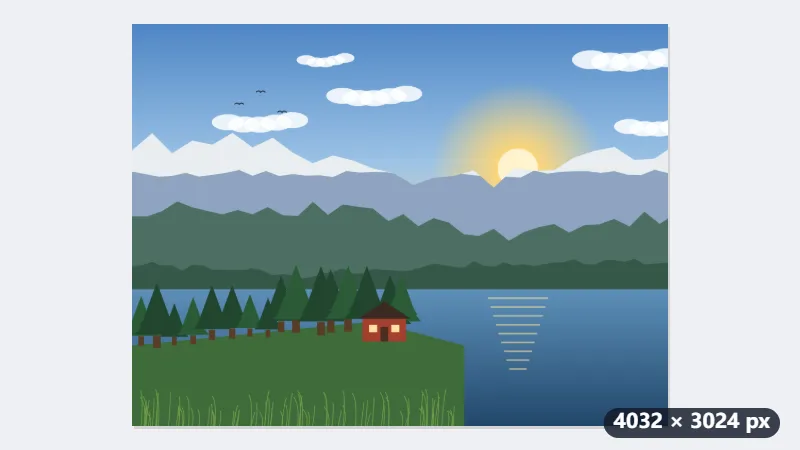
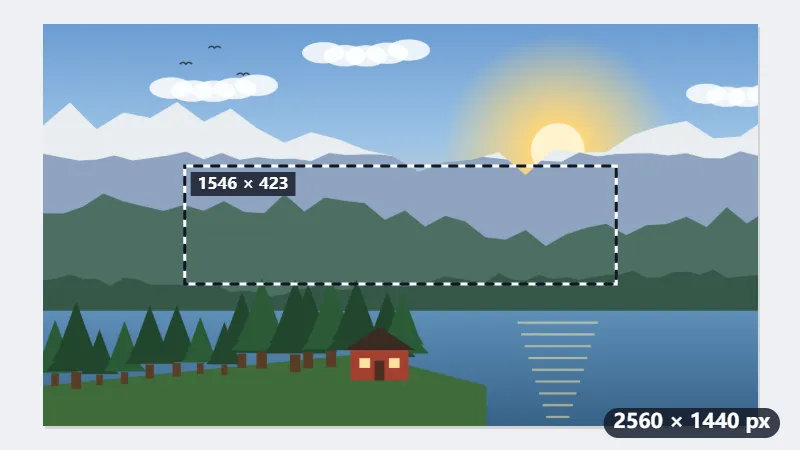
- Drop the photo. Fill and crop is already chosen, and the 16:9 frame takes the full width: 4032 × 2268 pixels, leaving out 378 pixels at the top and 378 at the bottom.
- Drag the frame up or down to keep more sky or more ground; the middle of the frame is what every screen shows.
- Press Resize for YouTube: the frame is scaled down by a factor of 1.575 to exactly 2560 × 1440.
| Screen | Part of the banner shown | On the original photo (centred) |
|---|---|---|
| Television | 2560 × 1440 (all of it) | 4032 × 2268 |
| Desktop | about 2560 × 423 | about 4032 × 666 |
| Phone | 1546 × 423 | about 2435 × 666 |
On a phone only a strip about 2435 × 666 pixels across the middle of the photo stays visible: that is where the subject and the channel name belong. The file itself is exactly 2560 × 1440, ready to upload in YouTube Studio.
How it works
- Drop the image you want as channel art.
- Fill and crop is already chosen and a 16:9 frame appears. Put the part that matters — your name, your face — in the middle of it.
- Press Resize for YouTube. The result is exactly 2560 × 1440 pixels, which is the file YouTube asks you to upload.
- Upload it in YouTube Studio under Customisation, and check the preview it shows for TV, desktop and mobile before saving.
Frequently asked questions
- What size is a YouTube channel banner?
- The YouTube channel banner size is 2560 × 1440 pixels (16:9), with the middle 1546 × 423 as the safe area every screen shows.
- Why is my text cut off?
- Because 2560 × 1440 is the canvas, not what people see. A television shows all of it. A desktop shows a strip about 2560 × 423 across the middle. A phone shows only the middle 1546 × 423. Anything outside that central rectangle is visible to some viewers and not others, so a name placed near the edge disappears for most of them.
- So what should I put where?
- Put the channel name, logo and anything that must be read inside the middle 1546 × 423 — about 60% of the width and under a third of the height, centred. Use the rest for texture that can be cut without being missed: a gradient, a photograph, a pattern.
- Can I just upload a 1546 × 423 image?
- You can, and it will be accepted, but YouTube stretches it to fill the wider views, so it will look soft on a desktop and worse on a television. Uploading the full 2560 × 1440 is what keeps it sharp everywhere.
- How do I resize an image to 2560 × 1440?
- Drop it here with Fill and crop chosen: a 16:9 frame is placed on it, you move it over the part you want, and the result is exactly 2560 × 1440. Fit inside keeps the whole picture instead: a 4032 × 3024 photo becomes 1920 × 1440 in the middle, with 320 pixels of padding each side — white in a JPG, transparent in a PNG or WebP.
- Can I keep the banner file small?
- Yes: choose a size under “Keep the file under”, from 20 KB to 500 KB. The banner stays 2560 × 1440 and only the quality is lowered to fit; a PNG kept in its own format is saved as JPG for this, because a PNG cannot trade quality for bytes.
- Is my image uploaded here?
- No. The crop and the resize happen in your browser; the file only leaves your device when you upload it to YouTube yourself.
Made for a specific use
- Instagram post size
- Instagram portrait size
- Instagram Story size
- YouTube thumbnail size
- X post image size
- X header size
- Facebook cover size
- LinkedIn banner size
- LINE profile picture size
- TikTok size
- Pinterest pin size
- Facebook link preview size
- Passport photo size
- My Number card photo size
- 30×40 mm ID photo
- 45×60 mm ID photo
- A4 at 300 dpi
- DNI photo size
- 50×60 mm biometric photo
- Argentine 4x4 photo
- Web résumé photo (450 × 600 px)
- Tamaño infantil photo (2.5 × 3 cm)
- 5×7 cm photo
- US visa photo size
- Bulk resize images
- Resize image in pixels and KB
- Resize an image in centimetres