Facebook link preview size: 1200 × 630
1200 × 630, the picture a shared link shows. Nothing is uploaded.
Drop files here
or click to choose from your deviceAccepted: JPG, JPEG, PNG, WEBP, AVIF, GIF, BMP, HEIC, HEIF
Up to 3 files per runUp to 20 MB per file5 runs per dayRemove limits with Pro✓ Works offline
Your files stay on your device
This tool runs entirely in your browser. Nothing is uploaded, nothing is stored, and you can even turn off your internet connection before you start.
Example
Example: a 4000 × 3000 lakeside cabin photo as the 1200 × 630 link preview
The owner of a holiday cabin is launching its booking page and wants a large picture when the link is shared on Facebook. Her photo is 4000 × 3000 pixels (4:3): the lake, the mountains, and the red cabin on the shore to the lower left.
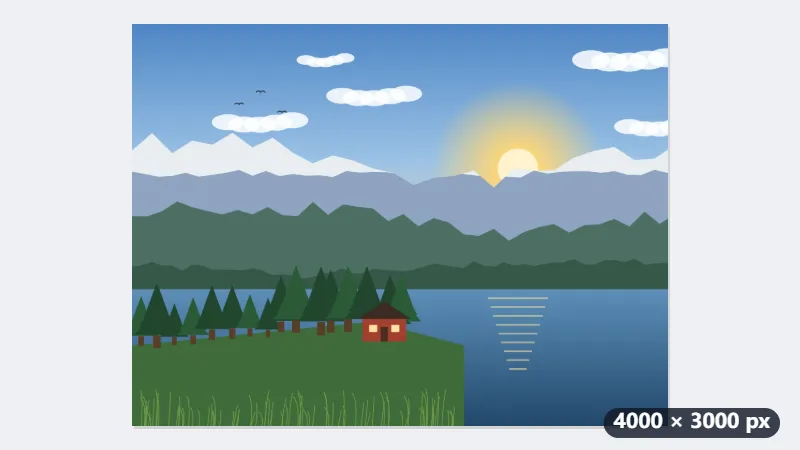
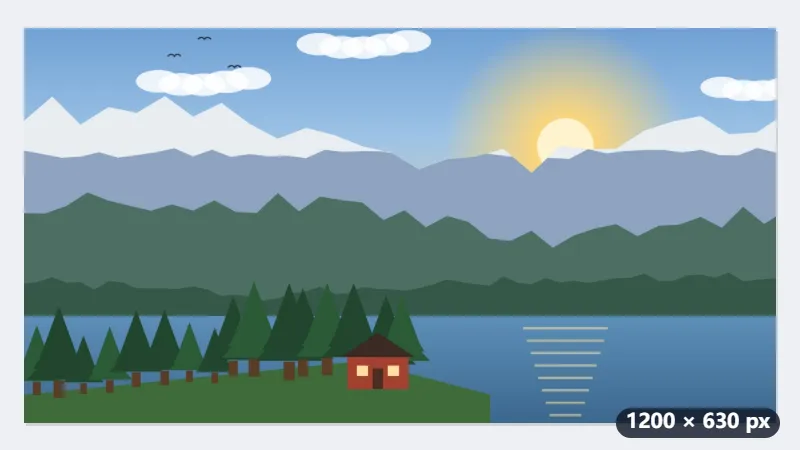
- Drop the photo. Fill and crop places a 1.91:1 frame of 4000 × 2100 pixels in the middle, so 450 pixels go from the top and 450 from the bottom.
- The cabin stays inside the centred frame, near its lower edge; drag the frame if your subject sits nearer the top or bottom.
- Press Resize for Facebook: what the frame holds is scaled down to exactly 1200 × 630 pixels.
- Upload it with the page and point the page’s og:image tag at it.
| Starting photo | Frame keeps | Final image |
|---|---|---|
| 4000 × 3000 (camera, 4:3) | 4000 × 2100 | 1200 × 630 |
| 6000 × 4000 (camera, 3:2) | 6000 × 3150 | 1200 × 630 |
| 3024 × 4032 (phone, upright) | 3024 × 1588 | 1200 × 630 |
| 1920 × 1080 (16:9) | 1920 × 1008 | 1200 × 630 |
An image of exactly 1200 × 630 pixels that Facebook, LinkedIn and messaging apps show as a large card. From a 3:2 camera photo only 425 pixels go at the top and bottom; from an upright phone photo less than half the height stays, so place the frame with care.
How it works
- Drop the image that should appear when your link is shared.
- Fill and crop is already chosen; a 1.91:1 frame appears. Drag it onto the part that must survive.
- Press Resize for Facebook. The result is exactly 1200 × 630 pixels.
- Download it and use it as the page’s preview image, or attach it to the post.
Frequently asked questions
- What size is a Facebook link preview image?
- The Facebook link preview size is 1200 × 630 pixels (1.91:1), the image shown for a shared link.
- Is this the size for a photo post too?
- No — a plain photo post can be any shape and Facebook will show it whole. 1200 × 630 is specifically the picture that appears when a link is shared, the one read from the page’s og:image. That is where the wrong shape actually costs you.
- Does it work for other sites?
- Mostly yes. 1.91:1 at 1200 × 630 is what LinkedIn, Slack, Discord and most messengers read as well, because they all follow the same Open Graph convention. One image covers nearly all of them.
- What happens if the image is smaller?
- Below roughly 600 × 315 the preview collapses from a large banner to a small thumbnail beside the text, which is a much weaker link. Staying at 1200 × 630 keeps the large card.
- I changed the picture but Facebook still shows the old one. Why?
- Facebook keeps the preview it read the first time the link was shared. Paste the link into Facebook’s Sharing Debugger and choose Scrape Again so it reads the page and the new image; giving the new file a new name helps too.
- Should I save it as JPG or PNG?
- JPG for a photo: the file is much smaller and loads fast, and Keep the file under can cap it, at 200 KB for example. PNG suits a picture made of flat colours and text, such as a title card.
- Is my image uploaded?
- No. The crop and the resize happen in your browser.
Made for a specific use
- Instagram post size
- Instagram portrait size
- Instagram Story size
- YouTube thumbnail size
- X post image size
- X header size
- Facebook cover size
- LinkedIn banner size
- LINE profile picture size
- TikTok size
- Pinterest pin size
- YouTube banner size
- Passport photo size
- My Number card photo size
- 30×40 mm ID photo
- 45×60 mm ID photo
- A4 at 300 dpi
- DNI photo size
- 50×60 mm biometric photo
- Argentine 4x4 photo
- Web résumé photo (450 × 600 px)
- Tamaño infantil photo (2.5 × 3 cm)
- 5×7 cm photo
- US visa photo size
- Bulk resize images
- Resize image in pixels and KB
- Resize an image in centimetres