Resize to a 5×7 cm photo
591 × 827 pixels = 50 × 70 mm at 300 dpi, the Brazilian passport photo, cropped on your own device.
Drop files here
or click to choose from your deviceAccepted: JPG, JPEG, PNG, WEBP, AVIF, GIF, BMP, HEIC, HEIF
Up to 3 files per runUp to 20 MB per file5 runs per dayRemove limits with Pro✓ Works offline
Your files stay on your device
This tool runs entirely in your browser. Nothing is uploaded, nothing is stored, and you can even turn off your internet connection before you start.
Example
Example: a child’s Brazilian passport photo from a phone picture, at 5 × 7 cm
A Brazilian family living in the US is renewing their daughter’s Brazilian passport, and the application asks for a 5 × 7 cm photo. Her father photographs her against a plain light-grey wall with his phone: 3024 × 4032 pixels, upright.
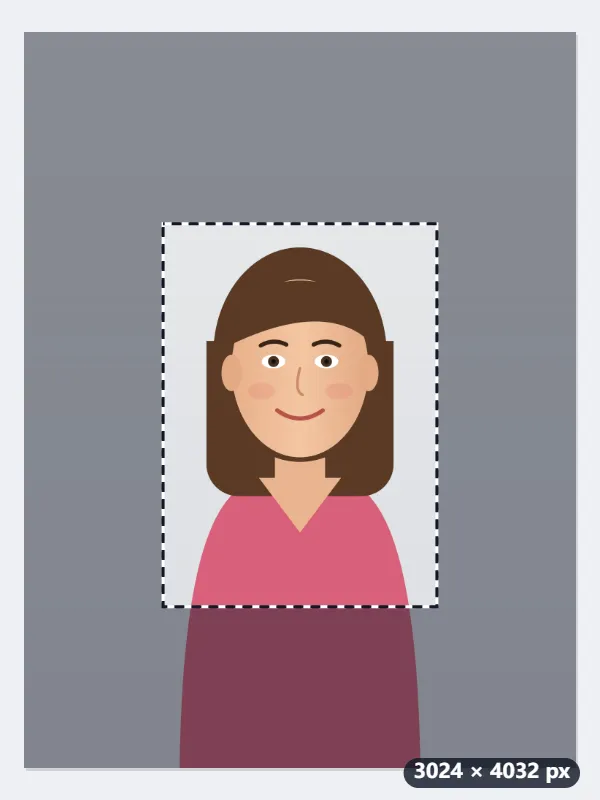

- He drops the photo. Fill and crop opens with the largest 5:7 frame that fits, 2881 × 4031 pixels, centred, so a thin strip is cut from each side.
- He pulls a corner in until the frame holds just her head and shoulders, about 1500 × 2100 pixels, and drags it so there is a little space above her hair.
- Resize to 5×7 cm scales what the frame holds to exactly 591 × 827 pixels; Same as original keeps it a JPG, marked 300 dpi.
- At the photo counter he asks for a print at 5 × 7 cm, not fit to page.
| Photo | First frame | Output |
|---|---|---|
| 3024 × 4032 (phone, upright) | 2881 × 4031 | 591 × 827 |
| 4000 × 3000 (camera, landscape) | 2144 × 3000 | 591 × 827 |
| 1080 × 1350 (upright social media size) | 965 × 1350 | 591 × 827 |
A 591 × 827 pixel JPG that prints at 5 × 7 cm, about 1.97 × 2.76 inches. Mind the unit: a US 5 × 7 print is 5 × 7 inches, far larger, and would be the wrong photo for the passport.
How it works
- Drop the portrait onto the box, or take one against a plain, light wall and pick it from your phone.
- Fill and crop is preselected and the frame is locked to 5:7. Drag it over your face and pull a corner so your head and shoulders sit inside, with a little space above your hair.
- Press Resize to 5×7 cm. The output is exactly 591 × 827 pixels.
- Download it and print it at 5 × 7 cm, or attach it to the application form.
Frequently asked questions
- Why 591 × 827 pixels?
- 50 mm ÷ 25.4 × 300 = 591 and 70 mm ÷ 25.4 × 300 = 827. At 300 dpi that prints as exactly 5 × 7 cm.
- Is this the same as a 3×4 photo?
- No. The 3 × 4 cm photo is the small one used on résumés and many everyday documents; 5 × 7 cm is the larger format the Brazilian passport asks for. Both have their own page here, so pick the one your form names.
- The frame will not take the whole picture. Why?
- The size is fixed at 591 × 827, so the frame keeps the 5:7 shape and the photo can never come out stretched. Whatever falls outside it is cut. Choose Fit inside instead if you want the full picture with padding around it.
- Does the file say 300 dpi?
- Yes. A JPG or PNG comes out marked 300 dpi, so photo software opens it at 5 × 7 cm. The pixel count is exact either way (a WebP file carries no dpi mark); at the print shop, still ask for 5 × 7 cm rather than fit to page.
- Is this the same as a 5 × 7 inch print?
- No. 5 × 7 cm is about 2 × 2.75 inches, the passport photo. 5 × 7 inches (127 × 178 mm) is the US print size for frames and cards, 1500 × 2100 pixels at 300 dpi; for that, use Resize an image in centimetres with Inches chosen.
- Is my photo uploaded?
- No. Cropping and resizing run in your browser. The free plan allows 3 files per run, 20 MB per file and 5 runs a day; Pro removes those limits.
Made for a specific use
- Instagram post size
- Instagram portrait size
- Instagram Story size
- YouTube thumbnail size
- X post image size
- X header size
- Facebook cover size
- LinkedIn banner size
- LINE profile picture size
- TikTok size
- Pinterest pin size
- Facebook link preview size
- YouTube banner size
- Passport photo size
- My Number card photo size
- 30×40 mm ID photo
- 45×60 mm ID photo
- A4 at 300 dpi
- DNI photo size
- 50×60 mm biometric photo
- Argentine 4x4 photo
- Web résumé photo (450 × 600 px)
- Tamaño infantil photo (2.5 × 3 cm)
- US visa photo size
- Bulk resize images
- Resize image in pixels and KB
- Resize an image in centimetres