TikTok video and photo size: 1080 × 1920
1080 × 1920, 9:16 full screen. Nothing is uploaded.
Drop files here
or click to choose from your deviceAccepted: JPG, JPEG, PNG, WEBP, AVIF, GIF, BMP, HEIC, HEIF
Up to 3 files per runUp to 20 MB per file5 runs per dayRemove limits with Pro✓ Works offline
Your files stay on your device
This tool runs entirely in your browser. Nothing is uploaded, nothing is stored, and you can even turn off your internet connection before you start.
Example
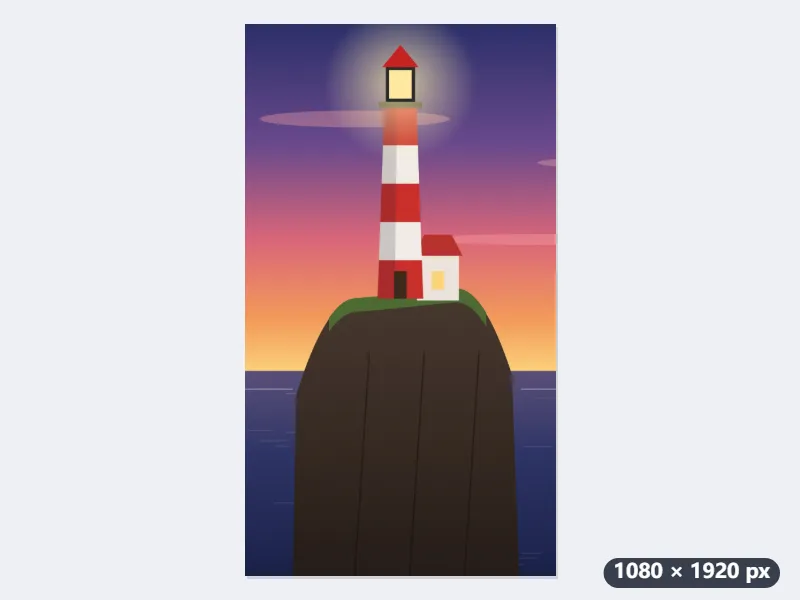
Example: a landscape lighthouse photo made into a 1080 × 1920 TikTok photo post
A phone photo taken sideways on a coastal walk, lighthouse.jpg, 4032 × 3024 pixels: a red and white lighthouse on a cliff in the left third, the sea at sunset to the right. It is going up as a full-screen photo post. Settings: Fill and crop (recommended), output format Same as original, Keep the file under: No limit.
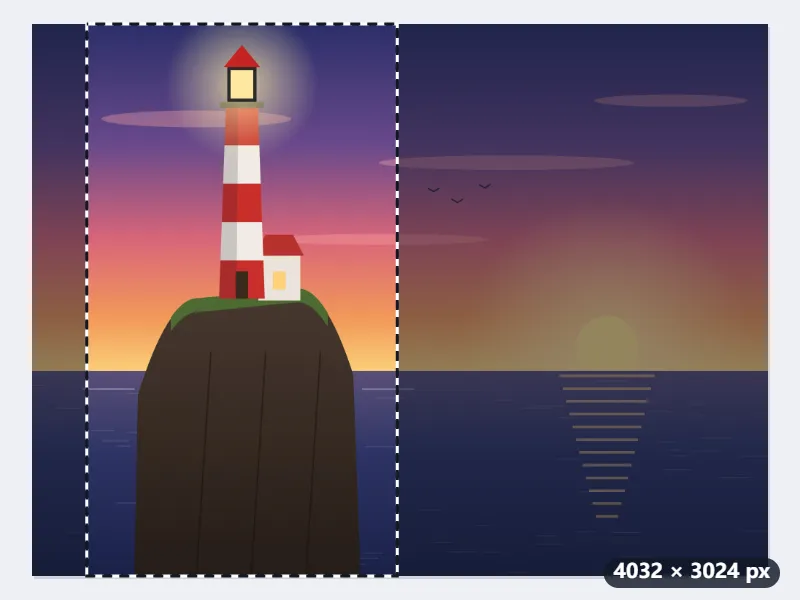
- When the photo is dropped, the largest 9:16 frame that fits appears in the middle: 1701 × 3024 pixels, starting at X 1166. Left there, it would cut the lighthouse in half at its left edge.
- Drag the frame left to X 300. It now runs from 300 to 2001 pixels, with the lighthouse in the middle and well away from the column of buttons TikTok puts down the right.
- Press Resize for TikTok. The 1701 × 3024 crop is scaled down to 63.5 % and saved as lighthouse-1080x1920.jpg; because it only shrinks, it stays sharp.
| Starting picture | First 9:16 frame | To reach 1080 × 1920 |
|---|---|---|
| 4032 × 3024 (phone, held sideways) | 1701 × 3024 | scaled down to 63.5 % |
| 3024 × 4032 (phone, held upright) | 2268 × 4032 | scaled down to 47.6 % |
| 1170 × 2532 (phone screenshot, taller than 9:16) | 1170 × 2080, cut from top and bottom | scaled down to 92.3 % |
| 1080 × 1350 (4:5 portrait post) | 759 × 1349 | enlarged 1.42 times |
| 1080 × 1080 (square) | 608 × 1080 | enlarged 1.78 times, softer |
| 1920 × 1080 (frame from a landscape video) | 608 × 1080 | enlarged 1.78 times, softer |
lighthouse-1080x1920.jpg is exactly 1080 × 1920 pixels in 9:16, the lighthouse centred with sea on both sides, so TikTok shows it full screen with no blurred bars. A square or small picture also comes out at 1080 × 1920, but enlarged; for a sharp post, start from the full-size photo from the phone.
How it works
- Drop the picture you want as a TikTok photo post or video cover. Vertical phone photos need almost no cropping.
- Fill and crop is already chosen: a 9:16 frame appears. Drag it onto the part you want filling the screen.
- Press Resize for TikTok. The result is exactly 1080 × 1920 pixels.
- Download and post it. Because the shape already matches, TikTok will not pad it or zoom it.
Frequently asked questions
- What size is a TikTok video or photo post?
- The TikTok video and photo size is 1080 × 1920 pixels (9:16), with the app’s buttons over the right and bottom.
- Where does TikTok put its own buttons?
- Down the right-hand side — profile, like, comment, share — and along the bottom, where the username and caption sit. Keep anything you need read out of roughly the right 150 pixels and the bottom 350, and away from the top 100 where the search and Following tabs are. The middle of the frame is the only part that is always yours.
- What happens if I post a square or 4:5 picture?
- It is shown inside the 9:16 screen with the rest filled in — usually a blurred, stretched copy of your own image. Nothing is lost, but a good deal of the screen stops being yours, and any text near the edges sits on top of the blur.
- Is 1080 × 1920 large enough?
- Yes. TikTok re-encodes everything, and uploading something much larger does not survive that; it only makes the upload slower. Exactly 1080 × 1920 is what the app targets.
- Can I keep the whole picture without cropping it?
- Yes: choose Fit inside (no cropping). The whole picture is scaled to fit inside 1080 × 1920 and the rest of the frame is filled: white when the result is a JPG, transparent for PNG or WebP. A landscape photo then sits as a band across the middle, which is exactly what Fill and crop avoids.
- What about a screenshot that is taller than 9:16?
- Most phone screens are taller than 9:16, so the frame takes the full width and trims the top and bottom instead. A 1170 × 2532 screenshot gets a 1170 × 2080 frame, which is scaled down to 92.3 % to make 1080 × 1920. Drag it up or down to choose what is trimmed: the status bar, or the keyboard.
- Is my picture uploaded?
- No. The crop and the resize happen in your browser, so the file never leaves your device.
Made for a specific use
- Instagram post size
- Instagram portrait size
- Instagram Story size
- YouTube thumbnail size
- X post image size
- X header size
- Facebook cover size
- LinkedIn banner size
- LINE profile picture size
- Pinterest pin size
- Facebook link preview size
- YouTube banner size
- Passport photo size
- My Number card photo size
- 30×40 mm ID photo
- 45×60 mm ID photo
- A4 at 300 dpi
- DNI photo size
- 50×60 mm biometric photo
- Argentine 4x4 photo
- Web résumé photo (450 × 600 px)
- Tamaño infantil photo (2.5 × 3 cm)
- 5×7 cm photo
- US visa photo size
- Bulk resize images
- Resize image in pixels and KB
- Resize an image in centimetres