Posterize an image
Flat bands of colour, like a screen print.
Drop files here
or click to choose from your deviceAccepted: JPG, JPEG, PNG, WEBP, AVIF, GIF, BMP, HEIC, HEIF
Up to 3 files per runUp to 20 MB per file5 runs per dayRemove limits with Pro✓ Works offline
Your files stay on your device
This tool runs entirely in your browser. Nothing is uploaded, nothing is stored, and you can even turn off your internet connection before you start.
Example
Example: a sunset in 4 levels of colour, like a screen print
sunset.jpg, 1200 × 800 px: an evening sky fading from orange through pink to dark blue, a yellow sun and dark hills in front. Settings: Levels 4, Colour “In colour”, Smooth first “A little”.

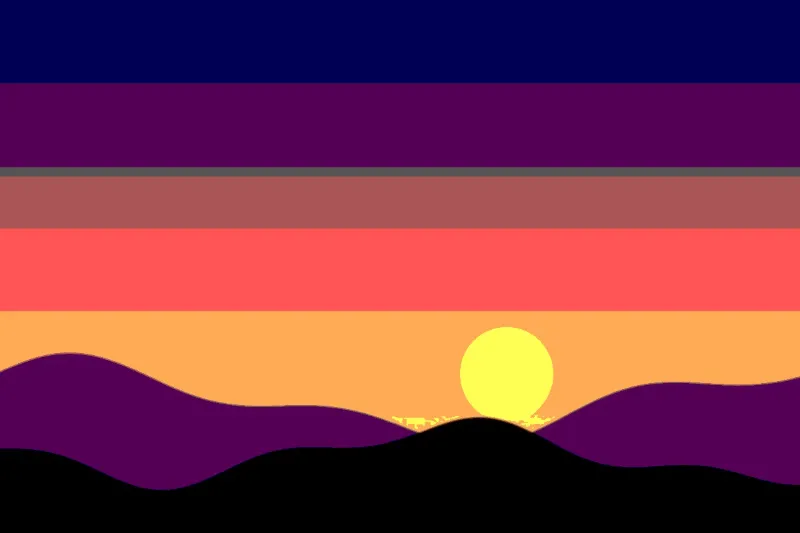
- “A little” smoothing first softens the picture by 1 pixel at this size (4 with “A lot”), so no speckles are left.
- Then each channel, red, green and blue, is set to one of 4 values: 0, 85, 170 or 255. The picture can have no more than 4 × 4 × 4 = 64 colours.
- The smooth sky breaks into a few bands with hard edges. The result is saved as sunset-posterized.jpg.
| Levels | Values per channel | At most colours |
|---|---|---|
| 2 | 0, 255 | 8 |
| 3 | 0, 128, 255 | 27 |
| 4 | 0, 85, 170, 255 | 64 |
| 5 | 0, 64, 128, 191, 255 | 125 |
| 6 | 0, 51, 102, 153, 204, 255 | 216 |
| 8 | 0, 36, 73, 109, 146, 182, 219, 255 | 512 |
A poster look in flat areas of colour. In grey, 4 values from black to white are spread over the photo’s own range of brightness instead, for a value study, and the file is called sunset-4-values.jpg.
How it works
- Add one or more pictures.
- Choose how many levels and whether in colour or grey.
- Smooth a little so skin and sky become single shapes, not speckles.
- Posterize and download.
Frequently asked questions
- What does posterize do?
- It cuts each colour channel into a few flat steps, so smooth shading becomes bands with hard edges — the look of a poster printed in a few inks.
- What is the grey mode for?
- Painters plan a picture in values first: how light or dark each shape is. In grey, the picture's own range is split into the number of values you choose, from black to white, which is exactly a value study.
- Why smooth first?
- A photo has grain, and cutting grain into levels leaves a speckle of tiny spots. Smoothing first merges them, so the result has shapes you can see and paint.
- How many levels should I use?
- Fewer levels, bolder look. With 2, each channel is 0 or 255, so at most 8 loud colours; 4 allows up to 64 and still reads as the photo; 8 allows up to 512, and the bands only show in smooth skies and skin.
- Does the grey mode use fixed shades of grey?
- No: the shades are spread over the photo’s own range, from its darkest to its lightest tones, leaving out the darkest and lightest 1 %. So a misty, low-contrast photo still gets the full run from black to white.
- Is anything uploaded?
- No. Everything happens in your browser.