Pixel art converter
A picture redrawn in big blocks and a small palette, like an old game.
Drop files here
or click to choose from your deviceAccepted: JPG, JPEG, PNG, WEBP, AVIF, GIF, BMP, HEIC, HEIF
Up to 3 files per runUp to 20 MB per file5 runs per dayRemove limits with Pro✓ Works offline
Your files stay on your device
This tool runs entirely in your browser. Nothing is uploaded, nothing is stored, and you can even turn off your internet connection before you start.
Example
Example: a cactus drawing as a 32 × 32 cross-stitch chart for 14-count Aida
A small cross-stitch for a greetings card, from cactus.png: a simple drawing, 1200 × 1200 pixels, a green cactus with a pink flower in an orange pot on white. Settings: Blocks across 32 — very chunky, Colours 8, Result size Enlarged, with crisp blocks, Draw a grid on.
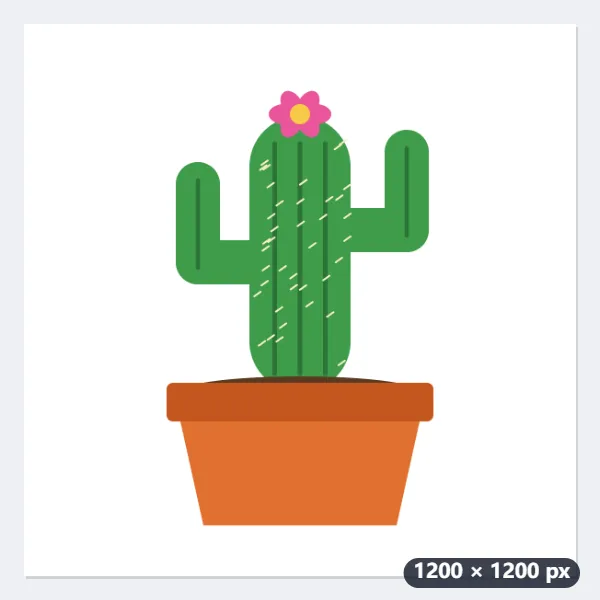
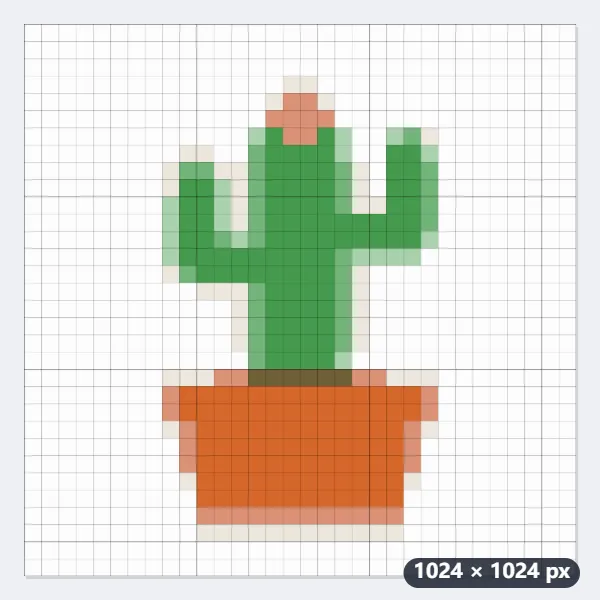
- The long side is split into 32 blocks. The picture is square, so the chart is 32 × 32, each block the colour of the area it covers.
- The colours are cut to at most 8, taken from the picture itself: one thread colour each. Soft edges come back as pale in-between greens and pinks; stitch them or use the nearest strong colour.
- Each block is drawn 32 pixels square: a 1024 × 1024 PNG with a line between blocks and every tenth line darker, so you count ten stitches at a time.
| Blocks across | Chart | PNG | On 14-count Aida | On 18-count Aida |
|---|---|---|---|---|
| 32 | 32 × 32 | 1024 × 1024 | 2.29 in (5.8 cm) | 1.78 in (4.5 cm) |
| 48 | 48 × 48 | 1008 × 1008 | 3.43 in (8.7 cm) | 2.67 in (6.8 cm) |
| 64 | 64 × 64 | 1024 × 1024 | 4.57 in (11.6 cm) | 3.56 in (9.0 cm) |
| 96 | 96 × 96 | 960 × 960 | 6.86 in (17.4 cm) | 5.33 in (13.5 cm) |
| 128 | 128 × 128 | 1024 × 1024 | 9.14 in (23.2 cm) | 7.11 in (18.1 cm) |
cactus-pixel-32x32.png: a chart of 32 × 32 = 1,024 squares, fewer to stitch if the white background is left as bare fabric. On 14-count Aida the design is about 2.3 inches (5.8 cm) square, right for a card; for a framed piece choose 64 blocks or more. One pixel per block gives a 32 × 32 file with no grid.
How it works
- Drop a picture onto the box. A clear subject on a plain background gives the best result.
- Choose how many blocks go across the long side: fewer is chunkier, more keeps detail.
- Choose how many colours the result may use, and whether to draw a grid for counting beads or stitches.
- Select Make pixel art and download the PNG.
Frequently asked questions
- Which settings look most like game pixel art?
- 32 to 64 blocks and 8 to 16 colours. Fewer blocks means each one stands for a larger area, so small details such as eyes disappear; a close-up of one subject survives best.
- What is the grid for?
- For turning the picture into perler or Hama beads, cross-stitch or a mosaic: each square is one bead or stitch, and every tenth line is darker so they are easy to count. The grid is only drawn on the enlarged result.
- What does "one pixel per block" give me?
- The picture at its real pixel-art size — 64 pixels across for 64 blocks — for game engines and pixel editors, which enlarge it themselves without blurring.
- Is transparency kept?
- Yes, with hard edges: pixels more than half transparent become fully transparent and the rest fully solid, as pixel art has no soft edges.
- How big will my cross-stitch be?
- Blocks divided by the fabric count, in inches: 64 blocks on 14-count Aida is 64 ÷ 14 = 4.6 inches (11.6 cm), on 18-count 3.6 inches (9.0 cm). The long side gets the blocks you choose; a 4:3 photo at 64 blocks is 64 × 48. For fuse beads, multiply by the bead size instead.
- How many thread or bead colours will I need?
- No more than the number of colours you chose. They are taken from your picture, so a white background uses one of them, and soft edges can add pale in-between shades. 8 or 16 colours suit most small designs; 64 is for photos.
- Is my picture uploaded, and what are the free limits?
- It is not uploaded: the picture is changed in your browser. The free plan allows 3 pictures of up to 20 MB per run and 5 runs a day. Pro removes these limits.