Perler bead pattern maker
From a picture to a pegboard pattern, bead by bead.
Drop files here
or click to choose from your deviceAccepted: JPG, JPEG, PNG, WEBP, AVIF, GIF, BMP, HEIC, HEIF
One file per runUp to 20 MB per file5 runs per dayFree PDFs end with a small “Made with nouplo.com” lineRemove limits with Pro✓ Works offline
Your files stay on your device
This tool runs entirely in your browser. Nothing is uploaded, nothing is stored, and you can even turn off your internet connection before you start.
Example
Example: a 20 × 20 pixel cactus on Perler beads, with the count for each bag
Jordan (fictitious) drew a potted cactus in a pixel-art app for a summer-camp craft table: cactus.png, exactly 20 × 20 pixels. Settings: Perler (5 mm), Beads across 20, Colours (at most) 6, “Leave the white background empty” and “Remove lone beads of a colour” ticked, coloured chart, US Letter.
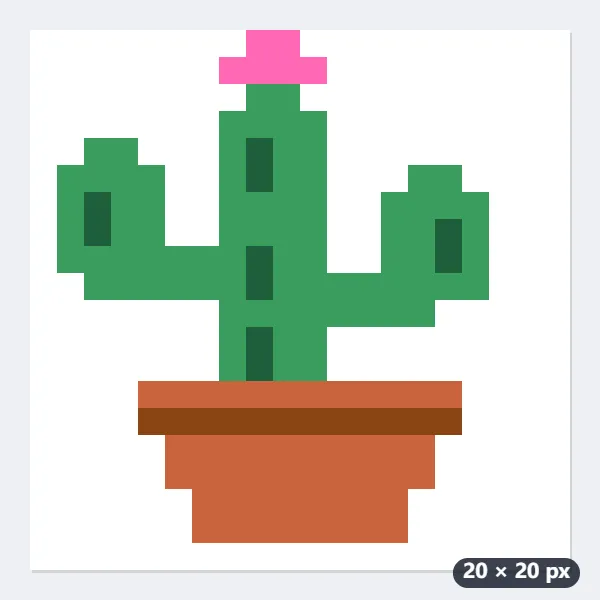
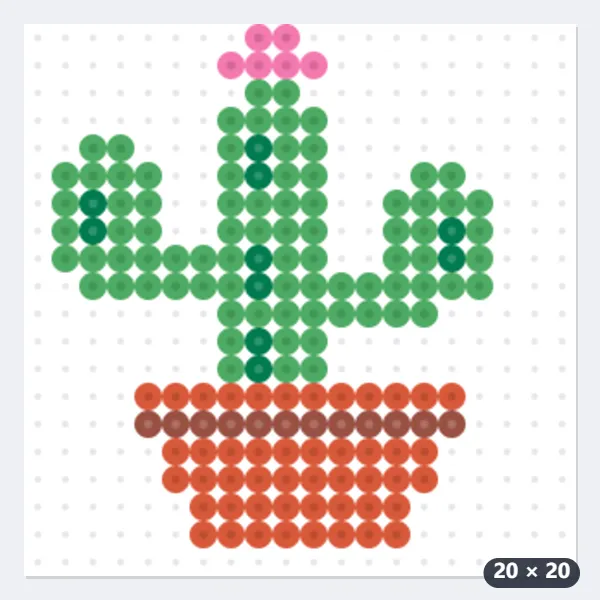
- The five colours become the nearest Perler ones: 80-19080 Green and 80-19010 Dark Green for the cactus, 80-15212 Spice and 80-19020 Rust for the pot, 80-15242 Cotton Candy for the flower.
- The white around the cactus reaches the edge of the picture, so those 243 pegs stay empty: 157 beads go on the board instead of 400.
- Page 1 says “Perler — 20 × 20 beads of 5 mm — about 10 × 10 cm (3.9 × 3.9 in) once ironed, on one pegboard of 29 × 29”, under the finished picture, then lists the colours.
- Page 2 is “Pegboard 1 of 1 — columns 1–20, rows 1–20”, a coloured dot and a symbol on every peg. Choosing 29 across would not make it bigger: 20 pixels stay 20 beads.
| Symbol | Code | Colour | Beads |
|---|---|---|---|
| X | 80-19080 | Green | 81 |
| O | 80-15212 | Spice | 48 |
| + | 80-19020 | Rust | 12 |
| / | 80-19010 | Dark Green | 10 |
| = | 80-15242 | Cotton Candy | 6 |
| Total | 157 |
cactus-bead-pattern.pdf (2 pages) and cactus-bead-pattern-preview.png, the picture as ironed beads. For 12 campers, set out 972 Green, 576 Spice, 144 Rust, 120 Dark Green and 72 Cotton Candy; each cactus fills a 20 × 20 corner of one large square pegboard.
How it works
- Choose a picture — pixel art, a cartoon or a logo works best — and crop it to what you want to bead.
- Pick the bead brand you own, how many beads across (29 fills one large square pegboard) and how many colours.
- Download the PDF: the finished picture, how many beads of each colour, and a page for each pegboard, a symbol on every peg.
Frequently asked questions
- Which bead colours does it use?
- The solid colours Perler, Hama Midi and Artkal S sell, with their codes and names, so you can pick the beads out of the right bags. Transparent, glitter, glow-in-the-dark and neon beads are left out, as a picture’s colours cannot be matched to them.
- How big will it be?
- Every bead is 5 mm once ironed, so 29 beads across is about 14.5 cm (5.7 in) — one large square pegboard. A bigger picture is split over several boards, a page for each, numbered as they fit together.
- What about the white background?
- White that reaches in from the edge of the picture is left off the board, as the background usually is. White inside the picture — an eye, a highlight — stays white beads, so the ironed piece has no holes.
- Why do small pictures work best?
- Beads are big: a photo of a face needs thousands of them and still looks rough. Pixel art, emoji, cartoons and simple logos come out cleanest, and the fewer colours you allow, the easier it is to bead.
- My pixel art is 16 × 16. Which width should I pick?
- Any width of 16 or more gives 16 beads across: the pattern never has more beads across than the picture has pixels, so each pixel becomes exactly one bead. Choosing 15 shrinks it to 15 beads.
- Why did part of my picture disappear?
- White (or almost white) that touches the edge of the picture is taken as background and left empty, together with any white joined to it side by side, so a white body or cloud that reaches the edge goes with it. Give it an outline in another colour, or untick “Leave the white background empty”. And while “Remove lone beads of a colour” is ticked, a single bead with no neighbour of its colour, such as a one-bead eye, takes the colour around it.
- Is anything uploaded?
- No. The picture is turned into the pattern in your browser; it is never sent anywhere.