Remove the background from a photo
Products, pets, plants and people cut out automatically, hair included, without the photo leaving your device.
Drop files here
or click to choose from your deviceAccepted: JPG, JPEG, PNG, WEBP, AVIF, GIF, BMP, HEIC, HEIF
Up to 3 files per runUp to 20 MB per file5 runs per dayRemove limits with Pro✓ Works offline
Your files stay on your device
This tool runs entirely in your browser. Nothing is uploaded, nothing is stored, and you can even turn off your internet connection before you start.
Example
Example: a handmade yellow mug on a plain white background for an online listing
Someone who makes pottery at home wants to sell a yellow mug online. The photo, mug.jpg, is square, 1200 × 1200 pixels: the mug on a light wooden table in front of green kitchen tiles, no person in it. Settings: Background White, Save as JPG.
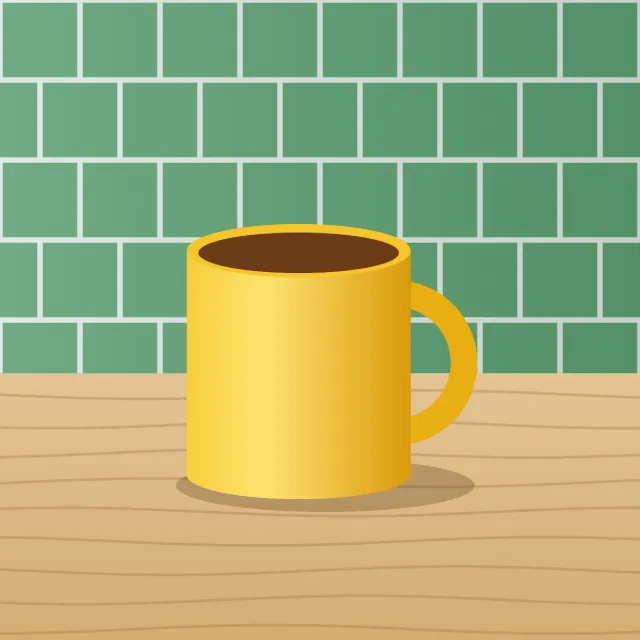
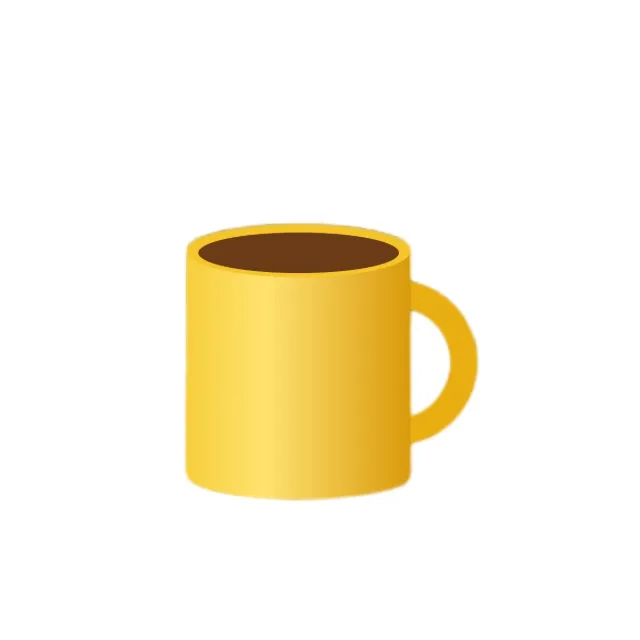
- There is no face in the photo, so it goes to the general model for objects, downloaded once (a 2.35 MB file).
- The model picks out the main subject, the mug; the table and the tiles are removed.
- The mug is placed on solid white (#ffffff) at the same size, 1200 × 1200 pixels, and saved as mug-white-background.jpg.
| Background | Colour | File you get |
|---|---|---|
| Transparent (PNG) | none | mug-no-background.png |
| White | #ffffff | mug-white-background.jpg or .png |
| Light blue (ID photos) | #b7d3ee | mug-lightblue-background.jpg or .png |
| Grey | #d9d9d9 | mug-gray-background.jpg or .png |
The mug alone on white, ready to be the first photo of the listing. On the free plan up to 3 photos go in one run, for example the mug from three sides; a portrait would go to the portrait model instead (about 16 MB), which keeps strands of hair better.
How it works
- Drop the photos you want cut out: a product, clothing, a plate of food, furniture, a plant, a car, a pet, a sign or a person. Several can be done in one run.
- Keep the background transparent or choose white, light blue or grey.
- Press Remove background. The tool looks for a face first and picks a model to match, then downloads it the first time: about 5 MB for the general model, about 16 MB for the portrait one.
- Download the results: transparent backgrounds as PNG, coloured ones as PNG or JPG.
Frequently asked questions
- Does it work on products, food, pets and other objects?
- Yes. A photo with no face in it goes to U-2-Net small, a model that looks for the one main subject in a picture, so products, clothing, food, furniture, plants, cars, pets and signs all cut out. Measured against hand-checked masks on 30 object photos it scores 0.891 mean IoU where the portrait model scores 0.719, and that average is kinder to the portrait model than it deserves: on objects it does not just score lower, it returns nothing usable at all, 0.007 on a wooden chair and 0.08 on a beer bottle.
- Which model runs on my photo?
- Whichever suits it. A 0.2 MB face detector runs first; a photo with a face goes to MODNet, the portrait model, exactly as before and with the same result (about 16 MB the first time), and everything else goes to U-2-Net small (Apache-2.0, a 2.35 MB file, about 5 MB with its runtime). On six people photos with exact masks the general model is level or slightly ahead, 0.979 against 0.956, but MODNet keeps flyaway hair strands that the general model trims, which is why portraits still use it. Either model takes about a second per photo, and the general one uses less memory. Both downloads are shared with Blur photo background, so using one tool pays for the other.
- Can it cut out two things at once?
- No. It cuts out one main subject. Several equally prominent objects give an unpredictable subset of them, and a small object in a busy scene can lose to the scene: a pair of scissors photographed on a car came back as the car. It finds the thing in the picture, not the thing you meant, so crop to what you want before cutting it out.
- Which photos give poor results?
- Photos where the subject is small in the frame, where it matches the background in colour, or where several things overlap can show rough edges; with people, hair or clothes close in colour to the wall behind them are the usual cause. Glass, bottles and windows come out solid: transparent and reflective areas count as part of the outline, so whatever was behind them stays inside the shape. A subject large in the frame against a distinct background works best.
- Does the photo keep its size, and what is the file called?
- It keeps its size: a 1200 × 1200 photo comes back 1200 × 1200, with the subject where it was. The name says what was done: mug.jpg becomes mug-no-background.png with a transparent background, or mug-white-background, mug-lightblue-background or mug-gray-background with a colour, as JPG or PNG.
- Are my photos uploaded?
- No. The model is loaded into your browser and the cut-out is computed on your device. It is downloaded once and kept by the browser, so later uses start straight away and work offline.
- What are the free limits?
- The free plan handles 3 photos per run, 20 MB each and 5 runs per day. Pro removes these limits.