Pop art maker
One photo, four tones, a grid of bold colours.
Drop files here
or click to choose from your deviceAccepted: JPG, JPEG, PNG, WEBP, AVIF, GIF, BMP, HEIC, HEIF
Up to 3 files per runUp to 20 MB per file5 runs per dayRemove limits with Pro✓ Works offline
Your files stay on your device
This tool runs entirely in your browser. Nothing is uploaded, nothing is stored, and you can even turn off your internet connection before you start.
Example
Worked example — Pop art maker
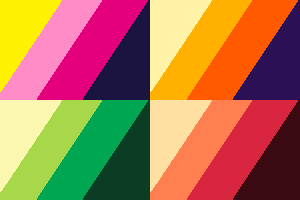
Add a photo: a portrait on a plain background works best. Use the following inputs and settings. Keep the other settings at the page defaults.

| Item | Value |
|---|---|
| Input files | 1 |
| Input | sample.png · 300 × 200 Pixels |
| Copies | 4 (2 × 2) |
| Colours | Classic |
| Output files | 1 |
| Output | sample-pop-art.png |
| Pixels | 300 × 200 |
Expected result — Output files: 1. 300 × 200 Pixels.
How it works
- Add a photo: a portrait on a plain background works best.
- Choose one, four or nine copies and the colours; add printed dots for a comic-book look.
- Select Make pop art and download the picture.
Frequently asked questions
- How is the pop art made?
- The photo is smoothed so its shapes are clean, then cut into four tones by its own brightness: shadows, two middle tones and highlights. Each copy in the grid paints those four tones in a different scheme of bold colours, and the dots, when on, print one middle tone as dots of the tone below it.
- What size is the result?
- The same size as the photo (up to 16 megapixels). With four copies each one is half as wide and half as tall, with nine a third. Choose one copy for a single large print.
- Can I use a photo with a transparent background?
- Yes, and it works well: the cut-out subject gets a flat background in a contrasting colour of each scheme, like a screen print. Remove the background first, then make the pop art. The result itself has no transparent areas.
- Is my photo uploaded, and what are the free limits?
- No. The pop art is made in your browser, so the photo never leaves your device, and there is no watermark. The free plan allows 3 photos of up to 20 MB per run and 5 runs a day; Pro removes these limits.