Glitch effect
Shifted slices, split colours and scan lines.
Drop files here
or click to choose from your deviceAccepted: JPG, JPEG, PNG, WEBP, AVIF, GIF, BMP, HEIC, HEIF
Up to 3 files per runUp to 20 MB per file5 runs per dayRemove limits with Pro✓ Works offline
Your files stay on your device
This tool runs entirely in your browser. Nothing is uploaded, nothing is stored, and you can even turn off your internet connection before you start.
Example
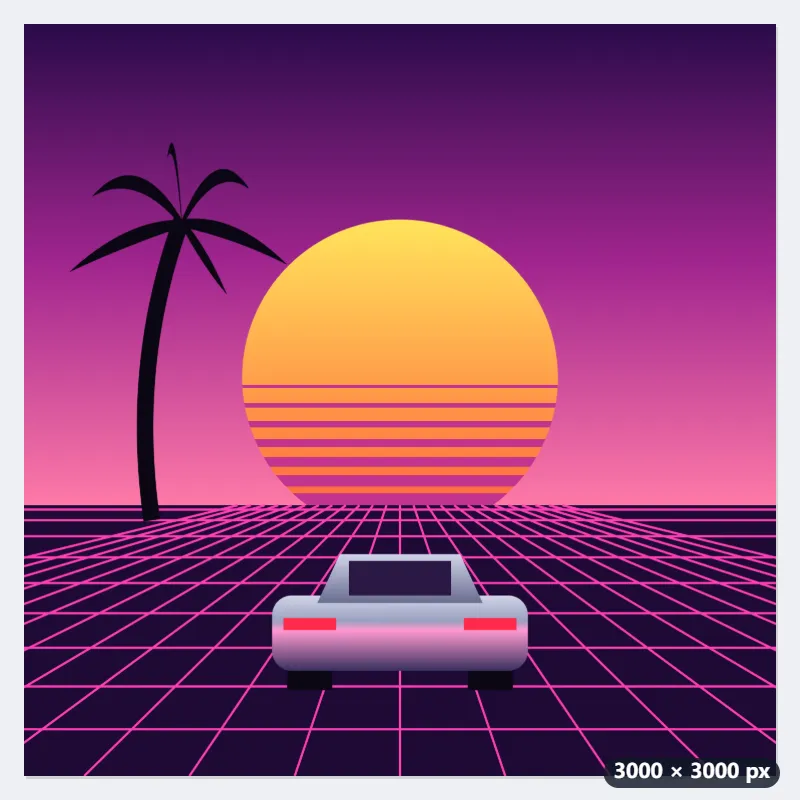
Example: a square synthwave single cover glitched at High, pattern 42
A bedroom producer wants the cover of a synthwave single to look like a tape that chewed itself: cover.png, 3000 × 3000 pixels, a pink and purple sunset behind a palm silhouette and a chrome car with no badges. Settings: Strength High, Scan lines and Broken blocks on, Pattern number 42, Save as The same format (PNG).
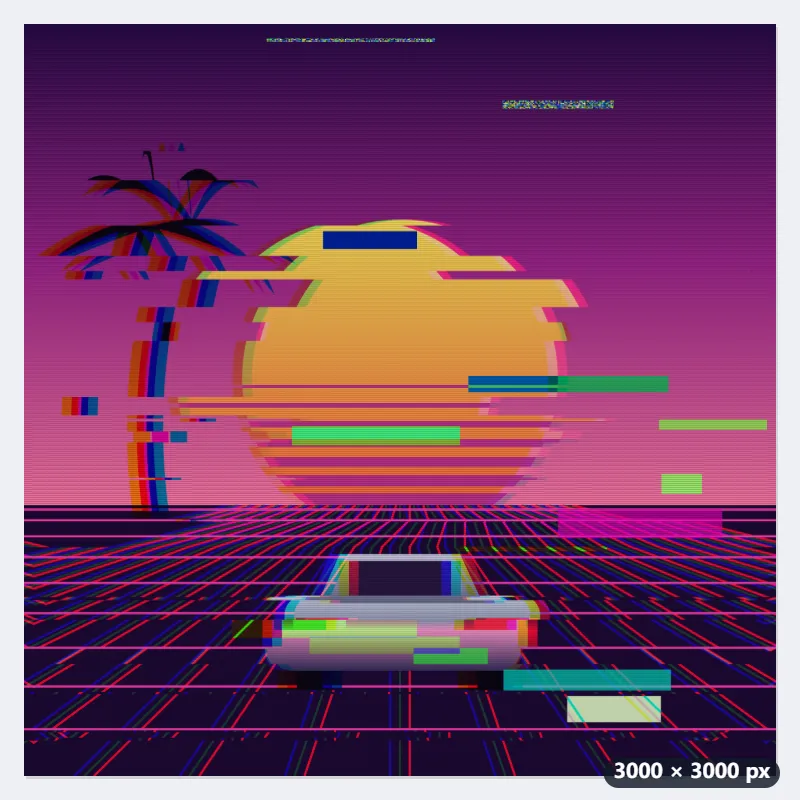
- High moves 24 slices by up to 11% of the width, 330 px here. With pattern 42 they form 24 bands; the biggest jump is rows 986–1018 from the top, pushed 321 px left.
- What leaves one edge comes back on the other: the 321 px pushed out on the left of that band reappear along the right edge. Rows 1987–2086 move 220 px right.
- Red is pulled 39 px right and blue 39 px left (1.3% of the width), so edges get coloured fringes; nine bands add a split of their own, from 9 to 57 px.
- Fifteen broken blocks: 6 with swapped colours, 3 inverted, 2 of noise, 1 smear and 3 bars of green, magenta and cyan. Then 375 scan lines, one every 8 rows, the darkest rows 30% darker.
| Strength | Slices | Largest shift | Colour split | Rows moved (of 3000) | Blocks | Scan lines, darkest |
|---|---|---|---|---|---|---|
| Low | 6 | 73 px | 12 px | 473 (15.8%) | 3 | 14% |
| Medium | 12 | 146 px | 21 px | 618 (20.6%) | 7 | 22% |
| High (used) | 24 | 321 px | 39 px | 1149 (38.3%) | 15 | 30% |
cover-glitch.png, still 3000 × 3000. 38.3% of the rows have moved, against 15.8% at Low with the same number. Pattern 42 always gives exactly this cover, so it can be made again from the clean file at any time; 43 would break it somewhere else.
How it works
- Add one or more photos.
- Choose the strength and whether to add scan lines and broken blocks; change the pattern number for a different glitch.
- Select Glitch it and download the picture.
Frequently asked questions
- What does the glitch do?
- It imitates a broken screen or a damaged file: strips of the picture are pushed sideways, the red and blue channels are pulled apart so edges get coloured fringes, small blocks turn into noise, swapped colours or bars of pure colour, and fine dark scan lines run across it.
- What does the strength change?
- Each step roughly doubles the damage. Low shifts a few thin slices a little, for a subtle glitch on a portrait; High shifts many more slices much further, splits the colours wider and breaks more blocks.
- What is the pattern number for?
- It decides where the slices and blocks fall, from 1 to 999. The same number always gives the same glitch, so you can get a result back or apply the same glitch to several photos; a different number gives a different one.
- Does it keep the size and transparency?
- Yes. The picture keeps the photo’s size (up to 16 megapixels), and a transparent background stays transparent in PNG and WebP. A JPG puts transparent areas on white.
- Can I give several photos the same glitch?
- Yes. Every photo in one run gets the same strength and pattern number, and the slices, shifts and blocks are placed as shares of each picture’s height and width, so pictures of the same shape get practically the same pattern at their own size. The free plan takes 3 photos per run.
- How many scan lines are there?
- One soft dark line every 360th of the height, and at least every second row: about 360 lines on any picture 720 pixels tall or more (375 on a 3000-pixel square, one every 8 rows). At its centre a line is 14%, 22% or 30% darker for Low, Medium and High. Untick Scan lines for a clean glitch.
- Is my photo uploaded, and what are the free limits?
- No. The effect is made in your browser, so the photo never leaves your device, and there is no watermark. The free plan allows 3 photos of up to 20 MB per run and 5 runs a day; Pro removes these limits.