Change the background of a photo
Swap in white, a colour, a gradient or your own picture. The photo never leaves your device.
Drop files here
or click to choose from your deviceAccepted: JPG, JPEG, PNG, WEBP, AVIF, GIF, BMP, HEIC, HEIF
Up to 3 files per runUp to 20 MB per file5 runs per dayRemove limits with Pro✓ Works offline
Your files stay on your device
This tool runs entirely in your browser. Nothing is uploaded, nothing is stored, and you can even turn off your internet connection before you start.
Example
Example: a jar of Seville orange marmalade on pure white for a shop listing
A home cook who sells marmalade online photographs a jar with a phone: marmalade.jpg, 3024 × 3024 pixels, a glass jar of orange marmalade with a red and white gingham cloth tied over the lid, on a wooden table in front of a beige wall. Settings: New background Pure white, Output format Keep original format.
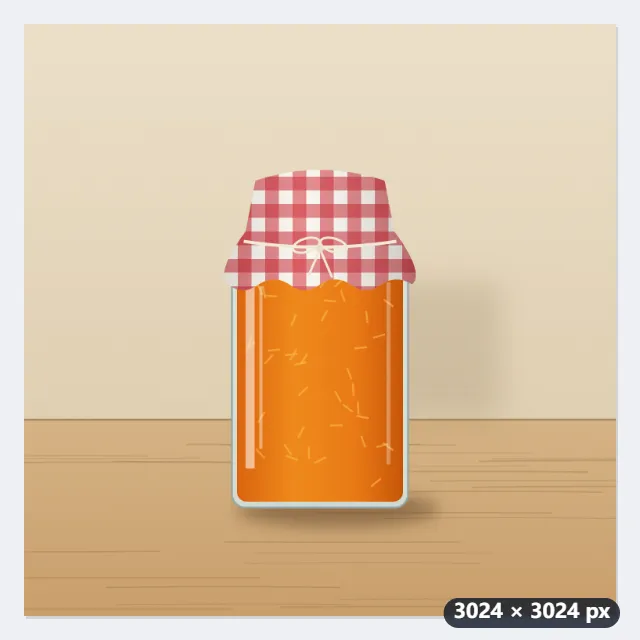
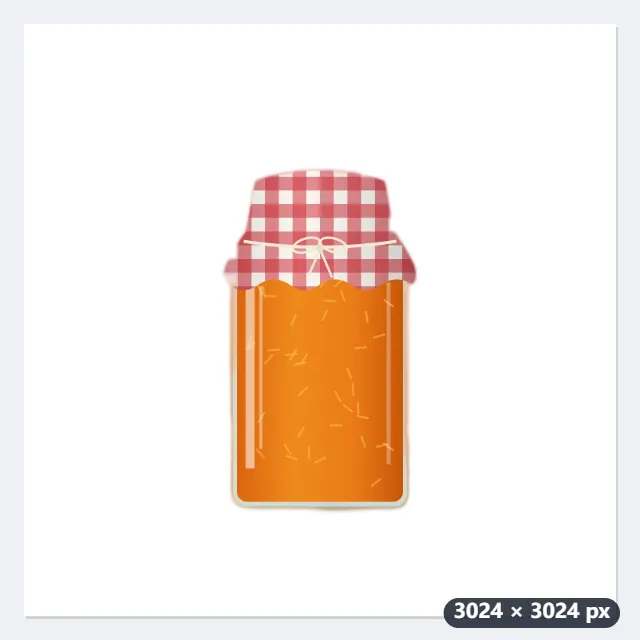
- There is no face in the photo, so the general model does the cut-out: about 5 MB, downloaded the first time only.
- The jar is cut out; the table and the wall go, and pure white, RGB 255, 255, 255, takes their place.
- Along the edge of the glass the colour is taken from the jar itself, so no beige halo is left around it.
- The file comes out as marmalade-new-background.jpg, still 3024 × 3024 pixels and still a JPG.
| New background | Colour |
|---|---|
| Pure white | #ffffff, which is RGB 255, 255, 255 |
| Light grey | #d9d9d9 |
| Pale blue | #b7d3ee |
| Beige | #efe6d9 |
| Black | #111111 |
| Grey gradient | #f7f7f7 at the top to #b9b9b9 at the bottom |
| Blue gradient | #dceafc at the top to #7ba7d9 at the bottom |
| Warm gradient | #fdeede at the top to #e3b98f at the bottom |
A photo ready to be the main image of the listing. The table goes with the wall: to keep the jar standing on something, choose My own picture with a photo of a kitchen worktop instead, and the jar is set on that.
How it works
- Drop the photos. Each one needs a clear main subject: a person, a product, a plate of food, a pet, a plant. Several photos can share one run and one background.
- Choose the new background. Pure white is RGB 255, 255, 255, which is what Amazon and most marketplaces ask for on a main product image. The gradients run light at the top to darker at the bottom, like a studio backdrop.
- To use a picture of your own, choose My own picture and pick the file. It is scaled up until it fills the photo and centred, so it is cropped rather than squashed; it stays on your device like everything else.
- Press Change background. The tool looks for a face first and picks a model to match, then downloads it with its runtime the first time: about 5 MB for the general model, about 16 MB for the portrait one. The cut-out and blur tools use the same files, so having used those means nothing extra is fetched.
- Download the results. Files keep their name with -new-background added, so your originals are left as they are.
Frequently asked questions
- Is the white background white enough for Amazon?
- Yes. The white here is pure white, RGB 255, 255, 255, the value Amazon requires on a main product image; other marketplaces do not check it, but a white background still reads cleanly in a grid of listings. Save as JPG or PNG; both keep the colour exactly. What no tool can fix is a photo where the product itself is white and the cut-out misses part of it, so check the edges of a white product before listing.
- What is the difference between this and removing the background?
- The same cut-out, a different last step. Remove the background leaves the space transparent in a PNG, for putting the subject into a design later; this paints something in behind it instead, which is what a listing photo, a CV portrait or a team page needs. If you want transparency, use the background remover.
- Can I use it for a passport or ID photo?
- It gives you the plain background those photos need, in white, light grey or pale blue. It does not check head size, position or the other rules, and many authorities do not accept a photo whose background was edited. For an official application, follow your own country's rules. The passport photo maker on this site does the measuring, scaling and framing for nine national standards, and the ID photo sheet tool lays several copies out for printing.
- Does it work on products and pets, or only people?
- Both. A photo with a face in it goes to MODNet, which keeps flyaway hair; anything else goes to U-2-Net small, which looks for the one main subject and handles products, food, pets, plants and cars. Two equally prominent objects, or a small object in a busy scene, can give an unpredictable result, so crop to your subject first.
- Why is there no coloured fringe around the subject?
- The old background leaves its colour in the half-transparent pixels along the edge, which is what shows as a green or red halo when you drop a cut-out onto a new background. Along that edge the tool takes the colour from the subject nearby instead, so the mixture with the old background is not carried over.
- How is my own background picture fitted to the photo?
- It is scaled up until it covers the whole photo and then centred, so it is trimmed rather than squashed. A 4000 × 3000 worktop photo behind a 3024 × 3024 product photo is scaled to 4032 × 3024 and loses 504 pixels on each side. Put what matters in the middle of the background picture.
- Are my photos uploaded, and what are the free limits?
- No. The model runs in your browser and both the photo and the background picture you choose stay on your device; the model file is kept by the browser after the first run, so later uses start straight away and work offline. The free plan handles 3 images per run, 20 MB each and 5 runs per day. Pro removes these limits.