Favicon generator — every size a website needs
One picture in; favicon.ico, apple-touch-icon, manifest icons and the tags to paste out.
Drop files here
or click to choose from your deviceAccepted: JPG, JPEG, PNG, WEBP, AVIF, GIF, BMP, HEIC, HEIF, SVG
One file per runUp to 20 MB per file5 runs per dayRemove limits with Pro✓ Works offline
Your files stay on your device
This tool runs entirely in your browser. Nothing is uploaded, nothing is stored, and you can even turn off your internet connection before you start.
Example
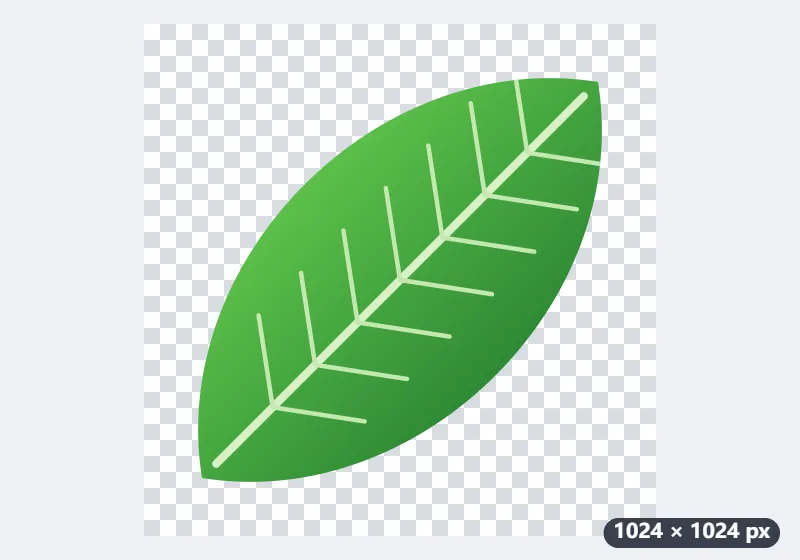
Example: every favicon for a gardening blog from one 1024 × 1024 PNG leaf
The logo of a small gardening blog, Leaf & Spade, is a 1024 × 1024 PNG: a plain green leaf, centred, on a transparent background. Settings: Fit Whole picture, Margin 10%, Shape Rounded corners, Background White, and Leaf & Spade as the site name.
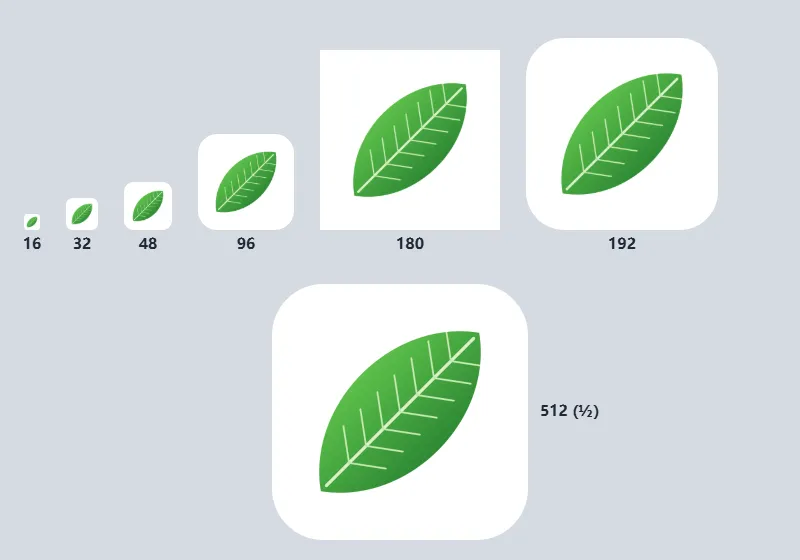
- A 10% margin on every side leaves the leaf 80% of each icon: 12.8 of the 16 px, 144 of the 180 px, 409.6 of the 512 px.
- Select Make favicons and download the ZIP of seven files.
- Put them at the root of the site and paste the four lines of favicon-tags.html into the head of every page.
| File | Pixels | Leaf drawn at | Used by |
|---|---|---|---|
| favicon.ico | 16, 32 and 48 | 12.8, 25.6 and 38.4 px | Browser tabs, bookmarks, anything asking for /favicon.ico |
| favicon-96x96.png | 96 | 76.8 px | Search results (a multiple of 48) |
| apple-touch-icon.png | 180 | 144 px | iPhone and iPad home screen: a full white square |
| web-app-manifest-192x192.png | 192 | 153.6 px | Android |
| web-app-manifest-512x512.png | 512 | 409.6 px | Android and the installed web app |
| site.webmanifest | – | – | Name and short name “Leaf & Spade”, the two icons, colour #ffffff |
| favicon-tags.html | – | – | The four lines for the page head |
Seven files with the leaf on white rounded squares; the Apple icon is a plain white square because iOS rounds the corners itself. No favicon.svg, as the logo was a PNG. The 12-character name is used whole as the short name; a longer one such as Hawthorn Road Allotments would become “Hawthorn”, cut after the last whole word that fits.
How it works
- Add your logo: a square SVG is best, otherwise a PNG or JPG of at least 512 × 512 px.
- Choose how it sits in the square — the whole picture with an optional margin, or filling the square — and the shape and background.
- Select Make favicons, then download everything at once as a ZIP.
- Put the files at the root of your site and paste the tags from favicon-tags.html into the <head> of your pages.
Frequently asked questions
- What size should a favicon be?
- A favicon.ico holds 16 × 16, 32 × 32 and 48 × 48 pixels; Apple devices use a 180 × 180 PNG, and Android and web apps 192 × 192 and 512 × 512. Search results show the icon at 48 × 48 or a multiple of it. This generator makes every one of them from a single image.
- Which files do I get, and what is each one for?
- favicon.ico holds 16, 32 and 48 px in one file, for browsers and crawlers that ask for /favicon.ico. favicon-96x96.png is for search results, where Google wants a multiple of 48 px. apple-touch-icon.png (180 px) is the home-screen icon on iPhone and iPad. The two web-app-manifest PNGs and site.webmanifest are for Android and installed web apps. Starting from an SVG adds favicon.svg, and favicon-tags.html has the lines to paste into <head>.
- I chose a transparent background. Why is the apple-touch-icon not transparent?
- Because iOS does not show transparency on the home screen: it fills transparent pixels with black and rounds the corners itself. That one file is therefore always a full, opaque square, in the background you picked or in white. The other icons keep the transparency.
- Should I start from an SVG or a PNG?
- An SVG, if you have one. Each size is then drawn from the vector, so the 16 px icon is drawn at 16 px instead of being shrunk from a large bitmap, and you also get favicon.svg, which modern browsers prefer. From a PNG or JPG, use one at least 512 × 512 px; a detailed logo will not survive 16 px either way, which is what the margin and a simpler mark are for.
- What goes in the manifest’s short name?
- The site name, up to 12 characters, about what fits under an icon on a phone’s home screen. A name of 12 characters or fewer is used whole; a longer one is cut after the last whole word that fits, so “Hawthorn Road Allotments” becomes “Hawthorn”. If that reads badly, open site.webmanifest and write a short_name yourself.
- Is my logo uploaded?
- No. Every file is drawn in this page with your browser's canvas, and the ZIP is put together here too. Nothing is sent to a server.