Flip an image
Mirror selfies and pictures with backwards text in one click, right on your device.
Drop files here
or click to choose from your deviceAccepted: JPG, JPEG, PNG, WEBP, AVIF, GIF, BMP, HEIC, HEIF
Up to 3 files per runUp to 20 MB per file5 runs per dayRemove limits with Pro✓ Works offline
Your files stay on your device
This tool runs entirely in your browser. Nothing is uploaded, nothing is stored, and you can even turn off your internet connection before you start.
Example
Example: a leavers’ hoodie selfie whose CLASS OF 2026 came out backwards
A front-camera selfie on the last day of school, hoodie.jpg, 1080 × 1440 pixels: a simple figure in a navy leavers’ hoodie with CLASS OF 2026 printed across the chest. The phone saved the mirror view, so the print reads backwards, 6202 FO SSALC in mirror letters.
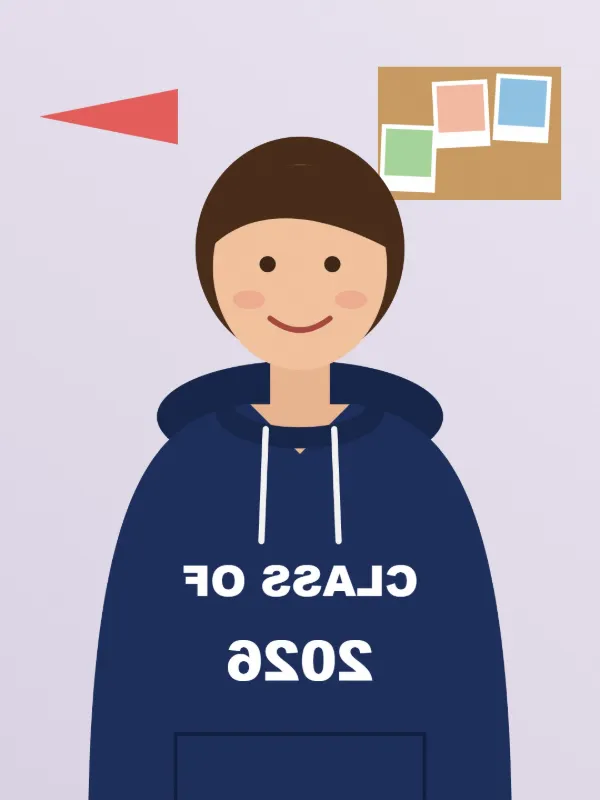
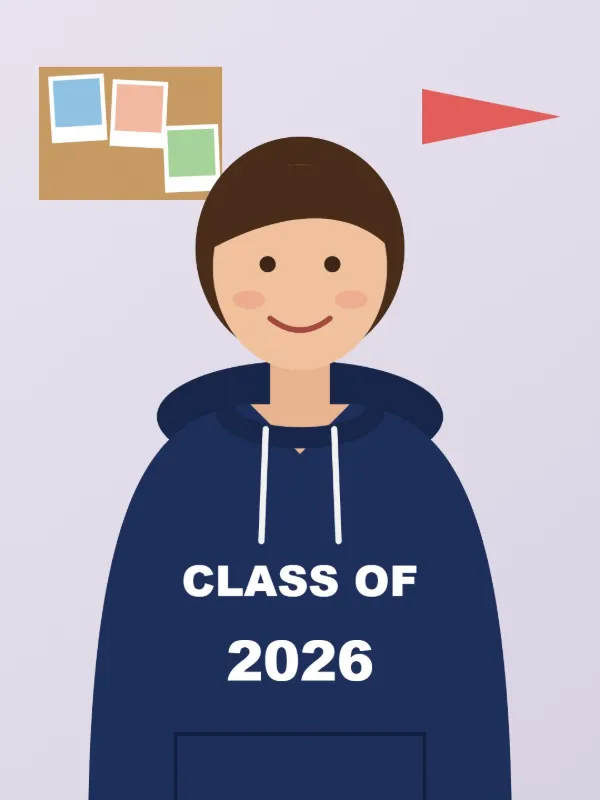
- Drop the photo. Flip is already on Mirror left to right, and Rotate on Do not rotate.
- Leave Output format on Keep original format, so the photo stays a JPG.
- Press Flip images and download hoodie-flipped.jpg.
| Rotate | Flip | What you get |
|---|---|---|
| Do not rotate | Mirror left to right | 1080 × 1440, CLASS OF 2026 reads normally |
| Do not rotate | Upside down | 1080 × 1440, top and bottom swapped, like a reflection in water |
| 180° | No flip | 1080 × 1440, upside down and still backwards |
| 90° clockwise | Mirror left to right | 1440 × 1080, turned on its side and then mirrored |
hoodie-flipped.jpg keeps its 1080 × 1440 pixels and the print reads CLASS OF 2026 again. The size only changes when a 90° turn is added, which swaps width and height; the file is then named -rotated instead of -flipped. A JPG is saved again at quality 0.92; choose PNG for no loss at all.
How it works
- Drop the images to flip.
- Mirror left to right is preselected; choose Upside down for a vertical flip.
- Add a rotation as well if the picture also needs turning.
- Press Flip images and download the results.
Frequently asked questions
- Why is the text in my selfie backwards?
- Front cameras show a mirror view, and some phones save the photo that way. Mirroring it left to right makes writing on clothes or signs readable again.
- Is flipping the same as rotating 180°?
- No. Rotating 180° turns the picture upside down and also swaps left and right, like turning a printed photo around. A vertical flip only swaps top and bottom, like a reflection in water.
- Does flipping lower the quality?
- No pixels are lost. JPG files are re-encoded at high quality; choose PNG for a lossless result.
- How do I mirror a design for an iron-on transfer?
- Drop the design, keep Mirror left to right and save it as PNG, so the edges stay crisp. Print the mirrored file on the transfer paper: ironing it face down flips it back, and the words read the right way round on the T-shirt.
- Does a flipped photo keep its size?
- Yes. Mirroring and turning upside down keep the width and height exactly as they were. Only a 90° turn, clockwise or counter-clockwise, swaps them: a 1080 × 1440 photo becomes 1440 × 1080.
- Are my images uploaded?
- No. Flipping happens in your browser. The free plan handles 3 images per run, 20 MB each and 5 runs per day.