Split an image into a grid
One picture in, a grid of equal tiles out, ready to post or print.
Drop files here
or click to choose from your deviceAccepted: JPG, JPEG, PNG, WEBP, AVIF, GIF, BMP, HEIC, HEIF
Up to 3 files per runUp to 20 MB per file5 runs per dayRemove limits with Pro✓ Works offline
Your files stay on your device
This tool runs entirely in your browser. Nothing is uploaded, nothing is stored, and you can even turn off your internet connection before you start.
Example
A 4000 × 1200 beach panorama cut into 3 square tiles for a carousel
A panorama from a week at the shore, beach.jpg, 4000 × 1200 pixels: blue sea, sand, a red-and-white umbrella on the left and a yellow sun on the right. It is going up as a carousel of three photos. Settings: 3 columns, 1 row, Square tiles ticked.
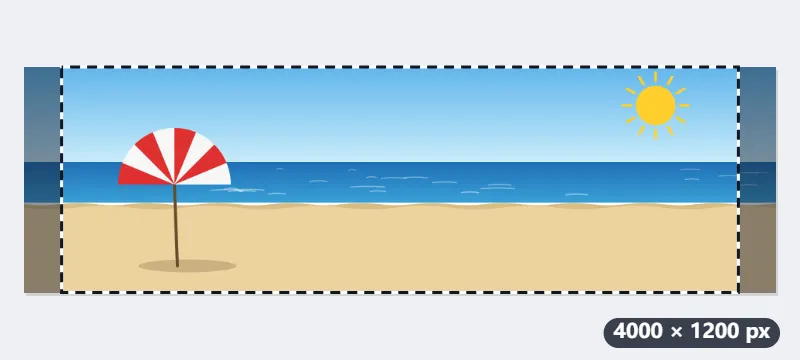
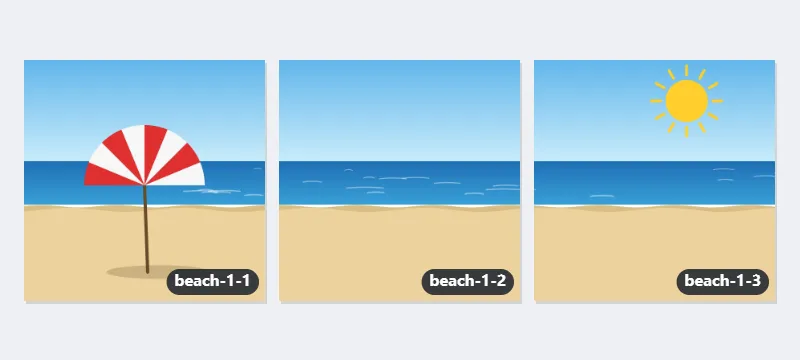
- Three square tiles side by side need a 3:1 picture, so 200 pixels are trimmed from each side and the middle 3600 × 1200 is kept.
- That middle is cut into three tiles of 1200 × 1200, which meet without losing a pixel.
- Select Split image and download beach-1-1.jpg, beach-1-2.jpg and beach-1-3.jpg, named by row and column.
| Picture | Grid | Tiles |
|---|---|---|
| 4000 × 1200 | 3 × 1, square | 3 of 1200 × 1200 (200 px off each side) |
| 4000 × 1200 | 3 × 1, not square | 1334, 1333 and 1333 × 1200 |
| 3240 × 4320 | 3 × 3 | 9 of 1080 × 1440 (3:4, lines up on a profile grid) |
| 4032 × 3024 (phone photo) | 3 × 3, square | 9 of 1008 × 1008 (504 px off each side) |
| 6600 × 5100 (22 × 17 in at 300 dpi) | 2 × 2 | 4 of 3300 × 2550, each a US Letter sheet, landscape |
Three square photos that join back into the whole beach as people swipe through the carousel. Add them in order, beach-1-1, the left tile, first.
How it works
- Drop the picture onto the box.
- Set the number of columns and rows: 3 × 3 for an Instagram grid, 3 × 1 for a panorama carousel.
- Tick Square tiles to cut the picture to the shape that makes every tile square, trimming evenly from both sides.
- Select Split image and download the tiles, named by row and column.
Frequently asked questions
- In which order do I post the tiles on Instagram?
- The files are named by row and column, -1-1 being the top left. A profile grid shows the newest post first, so post them from the last tile to the first: bottom right, then leftwards along the bottom row, and the top left last.
- Will the tiles line up on my Instagram profile?
- Instagram's profile grid shows each post cropped to a 3:4 rectangle, so square tiles lose their sides there and the picture no longer joins up. For a grid that lines up on the profile, start from a picture that is 3:4 itself (for example 3240 × 4320 px) and leave Square tiles off: each of the nine tiles is then 3:4 as well. Square tiles suit a panorama cut 3 × 1 and posted as one swipeable carousel.
- Are the tiles exactly equal?
- They are as equal as whole pixels allow. When the width does not divide evenly, a few tiles are one pixel wider, so nothing is lost at the edges.
- Can I split a picture to print as a poster over several sheets?
- Yes. Choose the grid that matches the sheets — 2 × 2 for four sheets — and print each tile full page. Start from as large a picture as you can, as each sheet shows only part of it.
- Can I cut a picture in half?
- Yes: 2 columns and 1 row give a left and a right half, 1 column and 2 rows a top and a bottom half. When the width is odd, the left half is one pixel wider, so the two halves still add up to the whole picture.
- Do the tiles lose quality?
- Each tile is cut from the full-size picture, never scaled. Saved as JPG or WebP, it is compressed again at high quality, which is hard to see; choose PNG for tiles with no further loss, at the cost of larger files.
- Is my picture uploaded, and what are the free limits?
- It is not uploaded: the tiles are cut in your browser. The free plan allows 3 pictures of up to 20 MB per run and 5 runs a day. Pro removes these limits.